Showing posts with label Bart. Show all posts

Sunday, February 25, 2018

Fake Steam Desktop Authenticator steals account details

In this blog post, we'll have a quick look at fake versions of Steam Desktop Authenticator (SDA), which is a "desktop implementation of Steam's mobile authenticator app".

Lava from SteamRep brought me to the attention of a fake version of SDA floating around, which may be attempting to steal your Steam credentials.

Indeed, there are some fake versions - we'll discuss two of them briefly.

Fake version #1

The first fake version can be found on steamdesktopauthenticator[.]com. Note that the site is live.

Figure 1 - Fake SDA website

When downloading the ZIP file from the website, and unzipping it, we notice the exact same structure as you would when fetching the legitimate package - with one difference: the main executable has been modified.

File details:
Name: Steam Desktop Authenticator.exe
MD5 hash: 872abdc5cf5063098c87d30a8fcd8414
File size: 1,4446 KB
Version: v1.0.9.1

Note that the current and real SDA version is 1.0.8.1, and its original file size is 1,444 KB - 2 bytes of difference can mean a lot. Figures 2 and 3 below show the differences.

Figure 2 - Sending credentials to steamdesktopauthenticator[.]com
Figure 3 - Sending credentials to steamdesktop[.]com

Indeed, it appears it also attempts to upload to another website - while digging a bit further, we can also observe an email address associated with the domains: mark.korolev.1990@bk[.]ru

While I was unable to immediately find a malicious fork with any of these domains, Mark has likely forked the original repository, made the changes - then deleted the fork. Another possibility is that the source was downloaded, and simply modified. However, it is more than likely the former option.

Fake version #2

This fake version was discovered while attempting to locate Mark's fork from the fake version above - here, we have indeed a malicious fork from GitHub, where trades/market actions appear to be intercepted, as shown in Figure 4 below.

Figure 4 - Malicious SDA fork (click to enhance)

Currently, when trying to access the malicious site lightalex[.]ru with a bogus token, a simple "OK" is returned - it is currently unknown whether market modifications would be successful.

Interestingly enough, when digging deeper on this particular domain, which is currently hosted on 91.227.16[.]31, it had hosted other SteamStealer malware before, for example cs-strike[.]ru and csgo-knives[.]net.

The malicious fork has been reported to GitHub.

Disinfection

Neither fake SDA versions reported here appear to implement any persistence, in other words; remove the fake version by deleting it, and perform a scan with your current antivirus and a scan with another, online antivirus, or with Malwarebytes for example.

Now, change your password for Steam, and enable Steam Guard if you have not yet done so.

Prevention

Prevention advise is the usual, extended advise is provided in a previous blog post here.

You may also want to take a look at SteamRep's Safe Trading Practices here.

Conclusion

SteamStealer malware is alive and well, as seen from my January blog post. This is again another form of attempting to scam users, and variations will continue to emerge.

Always download any software from the original source - this means the vendor's website, or in this case, the official SDA repository on GitHub:
https://github.com/Jessecar96/SteamDesktopAuthenticator

Follow the prevention tips above or here to stay safe.

Indicators

The post Fake Steam Desktop Authenticator steals account details appeared first on Security Boulevard.


from Fake Steam Desktop Authenticator steals account details

Thursday, January 25, 2018

Quickpost: SteamStealers via Github

Back in 2014, I created a blog post named 'Malware spreading via Steam chat', where I analysed and discussed one of the first 'SteamStealers' - malware that is exclusively targeting gamers, or at least those who use Steam.

You can read that blog post here. Another SteamStealer technique was via a Chrome extension, and there are many others reported as well - if you fancy a read, check out the blog post and paper here.

This blog is meant as a quick post and heads-up, as some cybercriminals who use SteamStealer, are now also resorting to using Github. I was notified of this by Malwarehunterteam on Twitter:

Also, anyone seen before a malware which replaces Steam trade links?
cc @bartblaze @spontiroli pic.twitter.com/XFcVQKy4On

— MalwareHunterTeam (@malwrhunterteam) January 12, 2018

In this example, Evrial uses Github to copy/steal clipboard contents, and replaces Steam trade offer links. Note that Evrial is a full-blown infostealer.

Another recent example, given to me by advicebanana, is a SteamStealer for the sole purpose of stealing your Steam credentials. In this specific case, the malware was redirected from:
http://screenpicture[.]pro/image293[.]jpg to the following page or Gist, hosted on Github:
https://raw.githubusercontent[.]com/Hamlo22888/Sur/master/image293[.]scr

While the gist is already offline at time of posting, it's possible some Steam users may have been tricked into downloaded and executing the file.

Interesting to note that the debug path in this specific sample is:

D:\asd\php\steam_complex\New_steal\new_steal_no_proxy\14ver -original(pubg+??????????)\SteamStealer\obj\Release\vv.pdb

While in my original blog post, from 2014, it was as follows:

d:\asd\????????_new\??#\add\SteamComplex\SteamStealer\?????????? ?????????? (18)\SteamStealer\obj\Release\vv.pdb

It appears the original SteamStealer developer is still going strong.

For preventing getting scammed or ending up with a SteamStealer on your machine, follows the prevention tips in this blog post.

Conclusion

SteamStealers are (again) alive and well. While there was a drop observed at some point, due to the enormous amount of scamming websites, it appears the SteamStealer malware is back in business.

Follow the prevention tips in my earlier blog post to stay safe.

Indicators


The post Quickpost: SteamStealers via Github appeared first on Security Boulevard.


from Quickpost: SteamStealers via Github

Wednesday, December 6, 2017

StorageCrypt ransomware, a coinminer and more

Lawrence over at Bleeping Computer posted an interesting blog yesterday:
StorageCrypt Ransomware Infecting NAS Devices Using SambaCry

In that blog, Lawrence pointed out quite some users had issues with a new ransomware, dubbed StorageCrypt, and possibly spread via a worm.

There is a Windows component and a Linux component. We'll briefly take a look at both, hopefully providing some additional insight and indicators.

Windows artifacts

美女与野兽.exe is the Windows component, and as pointed out by Lawrence, translates loosely to 'Beauty and the Beast'.

This executable is packed with ASPack, and appears to to display worm-like and backdoor behaviour, with the additional 'feature' of spreading itself via removable drives. After unpacking the sample, it reveals some interesting strings:

1.vbpSMSS.EXEhttp://www.freewebs.com/kelly6666/sm.txthttp://www.freewebs.com/kelly6666/lo.txtDBST32NT.LOG.bak.exeV1.8Start Success.logyyyymmddmmssTxt Open ,Repair the application! is running, Repair the application from backup. is running, Repair the application from MySelf. running is running, update the application !Get V Data!Read Tname to memory.icoKill icoExtractIcons...Write to Tname...ip addr addedGetFolderFileDate...Replace all attrib.I m here!-->Insert Error : for .dll.dll  HKEY_LOCAL_MACHINE\SOFTWARE\Microsoft\Windows NT\CurrentVersion\WinlogonShellexplorer.exe UserinitHKEY_LOCAL_MACHINE\SOFTWARE\Microsoft\Windows\CurrentVersion\RunWindows9xPacksHKEY_CLASSES_ROOT\txtfile\shell\open\command NOTEPAD.EXE %1HKEY_HKEY_CLASSES_ROOTHKEY_CURRENT_USERHKEY_LOCAL_MACHINEHKEY_USERSHKEY_PERFORMANCE_DATAHKEY_CURRENT_CONFIGHKEY_DYN_DATAErrorC:\boot_net.datC:\dosnal.exeFind all exe file from Local host*.exeDownload files is accomplish!Run files of download is success![autorun]Download files1 is accomplish!Run files1 of download is success!This program cannot be run in DOS mode.This program must be run under Win32Autorun.infsuccess.txtcmd.exe /C net view command.exe /C net view  to find to Create file.exeopen=.exeGet Local host IP: Rnd IP:DiskC:\dntboot.binip packet too_bigip unload

Whatever was hosted at www.freewebs[.]com, cannot be retrieved as it no longer exists.

In any case, binaries similar as to this one, appear to have been floating the web for quite a while, as can be observed in this analysis result from 2013 by Team Cymru's TotalHash.

I've uploaded the unpacked sample on Hybrid Analysis.

Linux artifacts

The Linux component appears to exist out of a Samba vulnerability, dubbed SambaCry, and assigned CVE-2017-7494 from earlier this year.

There are several components, which are listed in the table below.

Filename Hash Purpose
kJn8LUAZ.so 6b5b4fce04f36101c04c0c5b3f7935ea Downloads ‘sambacry’
ZbdofxPY.so 053bb22c2cedf5aa5a089bfd2acd31f6 Downloads ‘sambacry’
sambacry ffe17e314f7b1306b8badec03c36ccb4 Fetch other payloads
httpd1 a5e8cb2e7b84081f5b1f2867f2d26e81 Miner config
minerd32 a016b34ade18626f91d14e46588d6483 Coinminer
watchcat32 ac9ad6bc8cd8118eaeb204c2ebf95441 Watchdog
The 'sambacry' binary will, after one of the .so files has downloaded it, download a set of other files from the C2 server, which is 45.76.102[.]45.
These files are to support the coin mining and, alongside installed, is also what appears to be a watchdog, which monitors the miner process. Additionally, it runs the following in a loop:

while true do  

 ps -ef|grep -E "wget|curl"|grep -v $$|grep -v 45.76.102.45|awk '{print $2}'|xargs kill -9 

done

Whoever's behind this campaign is using the email address madhatterss@protonmail[.]com, as defined in the miner configuration:

{
        "url" : "stratum+tcp://xmr.pool.minergate.com:45560",
        "user" : "madhatterss@protonmail.com",
        "pass" : "x",
        "algo" : "cryptonight"
}

While analysing both Windows and Linux artifacts, I have not observed any ransomware behaviour, so likely the latter is installed manually later on by the attacker.

If you run a Samba server, patch immediately, as this vulnerability has already been reported in April.
Indicators


The post StorageCrypt ransomware, a coinminer and more appeared first on Security Boulevard.


from StorageCrypt ransomware, a coinminer and more

Sunday, December 3, 2017

Notes on Linux/BillGates

In a previous blog post, I wrote some (extensive) notes on Linux/Xor.DDoS, also known as just Xor.DDoS, an interesting type of Linux malware.

You can find that particular blog below, in which I give some history, details, remediation and prevention in regards to the specific threat Xor.DDoS poses:
Notes on Linux/Xor.DDoS

This post will include some notes on Linux/BillGates, hereafter referred to as just 'BillGates', and rather than being very in-depth as the previous blog, I will mostly list high-level notes and remediation or disinfection steps. Additionally, after the conclusion, you will find other resources if necessary. In case of questions, comments or feedback, leave a comment or contact me on Twitter.

What is BillGates?

BillGates is malware designed primarily for Linux, and since it is a botnet, it is mostly used for DDoS purposes.

However, just as Xor.DDoS, it has limited rootkit and backdoor functionality and thus it's possible remote commands are executed as well as additional malware downloaded.

How can I identify BillGates artefacts?
Please find below a table with indicators.
Indicator Notes
/etc/cmd.n
/etc/conf.n
/etc/init.d/DbSecuritySpt
/etc/init.d/selinux
/etc/rcX.d/97DbSecuritySpt Where X is a number, usually symlinks to /etc/init.d/DbSecuritySpt
/home/ll2 Identify all files with random names in /home/
/tmp/.bash_root.tmp3
/tmp/.bash_root.tmp3h
/tmp/bill.lock Identify all .lock files in /tmp/
/tmp/bill.lod Contains Process ID (PID) of malware main module
/tmp/gates.lod
(or gates.lock)
Contains PID of malware main module
/tmp/moni.lod
(or moni.lock)
Contains PID of malware 'watchdog'
/tmp/notify.file
/usr/bin/*.lock Identify all .lock files in /tmp/
/usr/bin/bsd-port/.sshd
/usr/bin/bsd-port/*.lock
/usr/bin/bsd-port/getty
/usr/bin/bsd-port/getty/*.lock Identify all .lock files in /usr/bin/bsd-port/getty/
/usr/bin/pojie Identify all files with random names in /usr/bin/
/usr/lib/libamplify.so Configuration file
How can I identify BillGates DDoS modules?

These modules are usually stored in /etc/, and will have the following names:
  • atddd 
  • cupsdd 
  • cupsddh 
  • ksapdd 
  • kysapdd 
  • sksapdd
  • skysapdd

It may however be useful to use the find command in conjunction with these names, in case they are residing in a different location than /etc/.

How can I identify other modifications BillGates made?

BillGates does create aliases and/or modifies/replaces files which are typically used to monitor processes or the network. The following may be replaced:

  • /bin/lsof
  • /bin/netstat
  • /bin/ps
  • /bin/ss
  • /usr/bin/lsof
  • /usr/bin/netstat
  • /usr/bin/ps
  • /usr/bin/ss
  • /usr/sbin/lsof
  • /usr/sbin/netstat
  • /usr/sbin/ps
  • /usr/sbin/ss
A copy of the legitimate files is normally stored in:
/usr/bin/dpkgd/

Additionally, check for any potentially created jobs by looking in:
/etc/cron.X where X is a name or folder, for example /etc/cron.daily.

You may also wish to look in:
/var/spool/cron/

Removal instructions

While the ps command may be replaced, top is not. Run the top command and verify any illegitimate processes, usually they will be randomly named. Alternatively, identify the *.lod and *.lock files, and use cat for example to read them, and identify the PID of the malware.

Then, use kill to end the malicious process(es), and remove the files or artefacts as indicated in the table above.

Afterwards, use mv to move the legitimate files back to their original location. You can also use a file manager to easily move them, if you have one.

You may also use an anti-virus to identify and remove any malicious files, for example ClamAV does a great job - BillGates is a rather older botnet by now and thus most antiviruses should have coverage for it. Don't forget to update the anti-virus' signatures first, if needed.

This same explanation but step-by-step to make it easy:

  • Identify malicious processes: use top or check the PID in BillGates' config files;
  • Kill malicious processes: use kill -9   to kill any of its processes;
  • Remove malicious files and folders, see the sections above;
  • Replace potentially hijacked files and restore them to their original location, see also above:
  • Identify any malicious tasks and delete them as indicated above;
  • Run top again to verify there are no malicious processes left;
  • Run an anti-virus or anti-malware as a secondary opinion;
  • Change your passwords, better be safe than sorry!
Conclusion

While Linux/BillGates may not be the biggest player on the market anymore, or even not as popular or common nowadays, the threat still exists, just like Xor.DDoS.
Practice proper security hygiene and take appropriate preventative measures.
In the resources section below, you may find additional useful links.
Resources

Blaze's Security Blog - Notes on Linux/Xor.DDoS
ValdikSS (Github) - BillGates botnet tracker

The post Notes on Linux/BillGates appeared first on Security Boulevard.


from Notes on Linux/BillGates

Saturday, November 4, 2017

CrunchyRoll hack delivers malware

Introduction

There's a Reddit post today with a PSA (Public Service Announcement) about Crunchyroll, a website that offers anime streaming, being hacked:

PSA : Don't enter crunchyroll.com at the moment, it seems they've been hacked.

As mentioned before, Crunchyroll offers anime streaming, and in their own words:

Enjoy your favorite anime & manga at the speed of Japan

The German Crunchyroll team has additionally issued the following warning:

And for our English-speaking audience
Please DO NOT access our website at the current time. We are aware of the issues and are working on it

— Crunchyroll.de (@Crunchyroll_de) November 4, 2017

The official CrunchyRoll Twitter account has tweeted the following:

ATTENTION ALL CRUNCHYROLL USERS!!

Please DO NOT access our website at the current time. We are aware of the issues and are working on it!!

— Crunchyroll (@Crunchyroll) November 4, 2017

If you are only interested in how to remove this malware, scroll down to the disinfection/removal section.

Update:  CrunchyRoll has announced, after a few hours, that the issue is resolved:

We've just gotten the all-clear to say that https://t.co/x1dBCM9X9C is back online!! Thank you SO MUCH for your patience ~ ❤️ pic.twitter.com/FQRRHowvp6

— Crunchyroll (@Crunchyroll) November 4, 2017

However, I still advise you to scroll over to the disinfection or removal section. Any questions, feel free to leave a comment, or contact me on Twitter.

Analysis

So, what happens when you visit the CrunchyRoll website? Curently, you get a message the website has encountered an error:

Figure 1 - CrunchyRoll error page

Earlier today, the CrunchyRoll website was showing the following:

Figure 2 - Likely hacked CrunchyRoll website (Image source)

While the CrunchyRoll team claims it was a DNS hijack, I have (so far) found no evidence as to the validity of this claim, and it rather appears someone was able to hack the website.

Either way, while this is bad, CrunchyRoll took swift action by taking down the website, and an investigation is under way.

What happens if you click the 'Download now' button? A new file, called CrunchyViewer.exe, will be downloaded from the following IP address:

109.232.225[.]12

This IP appears to have hosted fake antivirus software or similar in the past:

Figure 3 - Older resolutions (2010)

The newly download file is seemingly the legitimate CrunchyViewer or Crunchyroll, but, near the end of the file, there is a chunk of Base64 encoded data appended, as seen in Figure 4:

Figure 4 - base64 encoded data (click to enlarge)

Using a Base64 decoder, we get a new file, called svchost.exe. This binary will place a copy of itself in the current user's %appdata%\roaming folder, for example:

C:\Users\Yourusername\AppData\Roaming\svchost.exe

This file will periodically call to its C2, or command-and-control server, and wait for any commands:

145.239.41[.]131

Currently, it does not appear the C2 responds on that specific port (6969), however, it is online.

There are claims the malware will additionally install ransomware - I have not observed this behaviour, but it is definitely possible once the C2 sends back (any) commands. More likely, it is a form of keylogger - malware that can record anything you type, and send it back to the attacker.

Svchost.exe will also create an autorun entry:

Figure 5 - newly created run key (click to enlarge)

This basically means the malware will start every time you (re)boot or restart the machine.

Just for fun, it appear that the miscreant's name, or the person responsible for creating the malware is named Ben, as appears from the debug paths:

C:\Users\Ben\Desktop\taiga-develop\bin\Debug\Taiga.pdb 

c:\users\ben\source\repos\svchost\Release\svchost.pdb

Taiga is 'A lightweight anime tracker for Windows'. This does not mean they are involved, but rather that 'Ben' has decided to include Taiga in the package.

Update: the developer of Taiga has included a fix for 'CrunchyViewer':
https://github.com/erengy/taiga/issues/489

Disinfection/Removal

Disinfection is rather straightforward:

  • Remove the malicious "Java" Run key, by opening Regedit, and browsing to:
    HKEY_CURRENT_USER\SOFTWARE\Microsoft\Windows\CurrentVersion\Run
  • Delete the 'Java' key;
  • Reboot your machine;
  • Remove the malicious binary, by navigating to:
    %appdata%\Roaming (for exampleC:\Users\Yourusername\AppData\Roaming\)
  • Delete the 'svchost.exe' file.
  • Perform a scan with your installed antivirus product;
  • Perform a scan with an online antivirus, which is different from the one you have. Alternatively, perform a scan with Malwarebytes.
  • Change all your passwords if possible. Better be safe than sorry.

Prevention

Prevention  advise in general, which also pertains to CrunchyRoll's compromise:

  • Install an antivirus;
  • Keep your browser up-to-date;
  • Install NoScript if you have Firefox;
  • Install a 'well-rounded' ad-blocker, for example uBlock Origin (works with most browsers);
  • If a website you visit frequently suddenly looks completely different, or urges you to download whatever, be safe rather than sorry, and leave the website.
  • Additionally, try to Google or use social media to verify if anyone else is experiencing the same issue.

Conclusion

This hack shows that any website or organisation is, in theory, vulnerable to someone hijacking the website, and consequently download and install malware on a user's machine.

While it is uncertain what exactly happened, CrunchyRoll took correct action by taking the website down not too long after. At this point, it is best to monitor their Twitter account, and/or wait for an official statement.

If you have not executed the file, you should be safe. Follow the prevention tips above to stay secure.

IOCs


The post CrunchyRoll hack delivers malware appeared first on Security Boulevard.


from CrunchyRoll hack delivers malware

Thursday, July 20, 2017

The purpose of ransomware

Ransomware, a phenomenon now very well known, serves one ultimate and obvious purpose:Monetary gain for the cybercriminal(s).However, multiple scenario's are, in fact, possible. Consider any and all of the following:Deployed as ransomware, extortion;De...

from The purpose of ransomware

Monday, May 22, 2017

WannaCry: frequently asked questions

Unless you haven't accessed the internet for a week, you must have heard about WannaCry or one of the aliases it uses, such as WannaCryptor, WanaCry or WanaDecrypt0r.In this blog post, I'll try to answer, in clear & concise language, some of the mo...

from WannaCry: frequently asked questions

WannaCry: frequently asked questions

Unless you haven't accessed the internet for a week, you must have heard about WannaCry or one of the aliases it uses, such as WannaCryptor, WanaCry or WanaDecrypt0r.In this blog post, I'll try to answer, in clear & concise language, some of the mo...

from WannaCry: frequently asked questions

Friday, May 5, 2017

Tool to disable Intel AMT

I wrote a small tool yesterday that will enable you to disable Intel AMT.Read all about it on the Github page:https://github.com/bartblaze/Disable-Intel-AMTFeedback welcome.

from Tool to disable Intel AMT

Sunday, April 23, 2017

Ransomware, fala sério!


Recently, a user contacted me in regards to what looks like a new, Brazilian ransomware. In this blog post, we're taking a quick look at the ransom and how to unlock or decrypt your files.

TL;DR: to unlock your files, you can use the key or password: 123
Para desbloquear seus arquivos, você pode usar a chave ou a senha: 123

The title of this blog loosely translates to: ransomware, no way! (excuse my Portuguese)

The ransomware appears to call itself 'Sem Solução'; which translates to 'Hopeless' or 'No Solution'. I propose we call it 'Hopeless ransomware':


Figure 1 - 'Seus arquivos foram criptografados'

Sua IDNão a formas de recuperar sem comprar a senha, ser tenta eu apago tudo!O método de pagamento é via Bitcoins.  O preço é: 600,00 REAIS =  Bitcoins
Não tem Bitcoins?, pesquise no google e aprenda comprar ou clique em Compra Bitcoinsenvie os bitcoins para: 1LULpQbdvoAWqKzhe8fuMiPQ8iGdW36pk1Para receber a senha, voce precisa criar uma e-mail em https://mail.protonmail.comE enviar SUA ID para 785910@protonmail.com em 24h ou mais voce receberá a sua senha!, Obrigado..

Translated:

Your IDNot the ways to recover without buying the password, be try I delete everything!The method of payment is via Bitcoins. The price is: 600,00 REAIS = Bitcoins
Do not have Bitcoins ?, search google and learn how to buy or click Buy BitcoinsSend the bitcoins to: 1LULpQbdvoAWqKzhe8fuMiPQ8iGdW36pk1To receive the password, you need to create an email at https://mail.protonmail.comAnd send YOUR ID to 785910@protonmail.com in 24h or more you will receive your password !, Thank you ..

The price is 600 REAIS (Brazilian Real), which currently amounts to 0.15 BTC.
(176 EUR | 155 GBP | 199 USD)

Interestingly enough, the ransomware has a built-in function to detect whether or not your machine belongs to a domain, and if so, will increase the amount of ransom to be paid to a whopping 1000 REAIS, or 0.25 BTC. (293 EUR | 259 GBP | 333 USD)


Figure 2 - Func _get_bitcoin_value()


The ransomware author or authors is/are definitely not kidding: if you enter a wrong password, the ransom will start deleting files.

Figure 3 - 'Error!", "Senha de descriptografia errada, NA PROXIMA 500 ARQUIVOS SERÃO EXCLUIDOS!'


Files to encrypt, including those used in virtualization software such as VMware for example:

zip, 7z, rar, pdf, doc, docx, xls, xlsx, pptx, pub, one, vsdx, accdb, asd, xlsb, mdb, snp, wbk, ppt, psd, ai, odt, ods, odp, odm, , , odc, odb, docm, wps, xlsm, xlk, pptm, pst, dwg, dxf, dxg, wpd, rtf, wb2, mdf, dbf, pdd, eps, indd, cdr, dng, 3fr, arw, srf, sr2, bay, crw, cr2, dcr, kdc, erf, mef, mrw, nef, nrw, orf, raf, raw, rwl, rw2, r3d, ptx, pef, srw, x3f, der, cer, crt, pem, pfx, p12, p7b, p7c, abw, til, aif, arc, as, asc, asf, ashdisc, asm, asp, aspx, asx, aup, avi, bbb, bdb, bibtex, bkf, bmp, bpn, btd, bz2, c, cdi, himmel, cert, cfm, cgi, cpio, cpp, csr, cue, dds, dem, dmg, dsb, eddx, edoc, eml, emlx, EPS, epub, fdf, ffu, flv, gam, gcode, gho, gpx, gz, h, hbk, hdd, hds, hpp, ics, idml, iff, img, ipd, iso, isz, iwa, j2k, jp2, jpf, jpm, jpx, jsp, jspa, jspx, jst, key, keynote, kml, kmz, lic, lwp, lzma, M3U, M4A, m4v, max, mbox, md2, mdbackup, mddata, mdinfo, mds, mid, mov, mp3, mp4, mpa, mpb, mpeg, mpg, mpj, mpp, msg, mso, nba, nbf, nbi, nbu, nbz, nco, nes, note, nrg, nri, afsnit, ogg, ova, ovf, oxps, p2i, p65, p7, pages, pct, PEM, phtm, phtml, php, php3, php4, php5, phps, phpx, phpxx, pl, plist, pmd, pmx, ppdf, pps, ppsm, ppsx, ps, PSD, pspimage, pvm, qcn, qcow, qcow2, qt, ra, rm, rtf, s, sbf, set, skb, slf, sme, smm, spb, sql, srt, ssc, ssi, stg, stl, svg, swf, sxw, syncdb, tager, tc, tex, tga, thm, tif, tiff, toast, torrent, txt, vbk, vcard, vcd, vcf, vdi, vfs4, vhd, vhdx, vmdk, vob, wbverify, wav, webm, wmb, wpb, WPS, xdw, xlr, XLSX, xz, yuv, zipx, jpg, jpeg, png, bmp

Additionally, Steam users aren't spared of getting their files encrypted either:

Figure 4 - Executable files in Steam's games directory will be encrypted

In reality, it appears all files are encrypted, regardless of extension.

The ransomware ultimately calls home and leverages Pastebin to do so. However, when analysing the ransomware, none of the Pastebin links were online as they had been removed.

$data = "pcname=" & @ComputerName & "&hwid=" & $key & "&version=Locker"

At time of writing, no payments have been made as of yet to the Bitcoin address:
1LULpQbdvoAWqKzhe8fuMiPQ8iGdW36pk1

The ransomware encrypts files prepending the original extension with '.encrypted.'. For example;
image.png would become: image.encrypted.png

The ransomware is based on CryptoWire, an open-sourced ransomware written in AutoIT.


Decryption

To unlock your files, you can use the key or password: 123
Para desbloquear seus arquivos, você pode usar a chave ou a senha: 123

Note: as always, prevention is more important than decryption or disinfection! Have a look at the dedicated page I've set up here.


Conclusion

While ransomware is anything but uncommon, ransomware likely stemming from Brazil and specifically targeting Brazilian users and businesses, is less likely to happen. In fact, the only notable example, as far as I know, is TeamXRat also known as Xpan ransomware.

Below you may find IOCs.

IOCs


from Ransomware, fala sério!

Tuesday, March 28, 2017

Popular attacker tools & techniques: survey results

In my last blog post, I decided to create a survey as to get a better perspective on popular or favourite tools of attackers, red teamers and/or pentesters.Below  I present the results, with additional & minimal commentary from my side. Commen...

from Popular attacker tools & techniques: survey results

Monday, March 13, 2017

Survey: favourite Red team / Pentest / Attacker methods & tools

Yesterday I've set up a SurveyMonkey poll in regards to one's favourite Red team / Pentest / Attacker methods & tools.Purpose of this survey is to get a better insight into which TTPs actual attackers usually use, or at least to get an insight in t...

from Survey: favourite Red team / Pentest / Attacker methods & tools

Saturday, February 25, 2017

Android malware on the rise


Recently, a friend of mine encountered an interesting phishing attempt:

Don't often see this delivery method #phising #mobile #malware #apk pic.twitter.com/HgqtCUAox6
— Cristian Iankovszky (@cizky) January 31, 2017

The message reads:
DHL has attempted to deliver the parcel no.: 1993747, but nobody was available. Please arrange re-delivery using our mobile app: http://dhl-tracking[.]online/app.apk

In this blog post, we'll analyse the malware in question (Marcher, banking trojan) and provide disinfection and prevention advice. Click on any of the relevant links below according to your needs:

Analysis
Disinfection
Prevention
Conclusion
Resources


Analysis

When you visit the link, a file called app.apk gets downloaded with the following characteristics:

MD5 80c797acf9bdbe225e877520275e15f5
SHA1 f255de54ffbff87067cfa7bc30d6d87a00aded8f
SHA256 fcd18a2b174a9ef22cd74bb3b727a11b4c072fcef316aefbb989267d21d8bf7d
Package name ijrtc.jwieuvxpjavuklczxdqecvhrjcvuho


The application presents itself as 'DHL Express Mobile' while being installed and will ask for device administrator rights:

Figure 1 - System service


Basically, the app can do anything it desires:

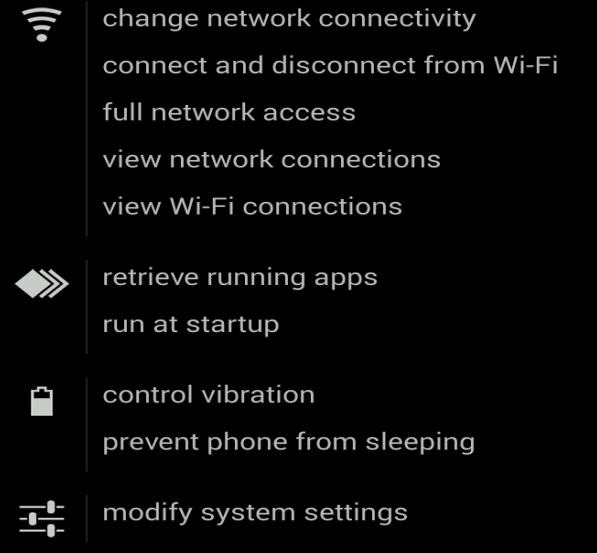
Figure 2 - Permissions; this includes & reading text messages

Figure 3 - Permissions; note the 'modify system settings'


The payload, or the actual malware that is installed, is the Marcher banking trojan. Recently, it has been masquerading as applications for package delivery, such as DHL in the example above, Posta Online or an app called Alza.

Marcher checks if any of the following antivirus or security products are installed:


Figure 4 - AV list


... And targets the following applications:

Figure 5 - Targeted apps


Besides targeting antivirus applications, Marcher also uses some nasty tricks to avoid removal:

  • Marcher installs itself as Device Administrator, effectively making the user unable to force the process to stop or uninstall the application normally;
  • When you attempt to force uninstall the application, it will show you the device administrator prompt, as seen in Figure 1, which will continue to pop-up.

All in all, the malware isn't obfuscated much, but still proves to have particular persistence mechanisms. One does not exclude the other.

If you are only here for Indicators of Compromise, please find below:


You may also want to check out my blog post which provides a plethora of options and software on how to analyze Android malware:
Analysing Android files


Disinfection

Marcher proves more difficult to remove as outlined above. The best way in this case is to back up your files and reinstall your operating system.

There is an excellent article on MakeUseOf on how to get to your phone's 'safe mode', create a back-up and finally factory restore or reinstall your operating system:
Dealing with System Problems in Android: Safe Mode, Factory Reset & Restoring Backups

Alternatively, you may try the following steps to remove Marcher, which also involves going into safe mode:


  • Hold down the Power button on the side of your phone until a popup appears.
  • On the menu that shows up, hold down the Power Off option until a popup appears.
  • Tap OK to reboot into Safe Mode.
  • You should now be in Safe Mode.
  • Go to Settings > Security > Device administration > Device administrators or Phone administrators.
  • Tap on the malicious application.
  • Tap Deactivate in the next screen. In our example:


Figure 6 - deactive the app


  • Now, go to  Settings > Applications or Apps > Manage applications > tap the malicious app > Uninstall.


For normal applications that don't have device administrator rights, only the last step is sufficient.

Afterwards, change all your passwords and notify your bank to be on lookout for any fraudulent transactions. Do this also if your bank is not listed as pictured in Figure 5.

Additionally, you may want to run a scan with an antivirus or antimalware product for Android. If you're unsure which antivirus to run, you can try Avast (it also detects the Marcher version discussed in this blog post).

You may want to have a look at other antivirus products if Avast does not suit your needs. A good comparison can be found on AV-test's website: The best antivirus software for Android

Note that the best course, in any case, is to backup your files and reinstall your device! Don't forget to change passwords and notify your bank.


Prevention

  • Don't root your Android device(s).
  • Don't just install any app. Use common sense. When in doubt, do not install the app.
  • Be wary of suspicious-looking apps even when they have a lot of positive feedback. These may be fake comments. Ask friends, colleagues or Google. Still not sure? Do not install the app.
  • Download from official app stores only. Even though malware may exist on Google's Play store, chances are less likely.
  • Use the default, built-in security in Android. For example, do not allow installation of apps from unknown sources and Encrypt Device.
  • Always verify app permissions. Depending on the app, it should not be able to directly call other phone numbers.
  • Back up your files. If something like this ever happens to you, simply reinstall and restore.
  • Install an antivirus. This may be a resident one, meaning no active protection and scanning only.

More useful links are listed below in the Resources section.


Conclusion

While Windows malware still takes the biggest portion, malware for other operating systems is becoming more and more common. In regards to Android, make sure to follow the prevention tips above to stay safe.

Worth noting that, as always, prevention is better than disinfection. Create back-ups.


Resources

Analysing Android files - Blaze's Security Blog
Dealing with System Problems in Android: Safe Mode, Factory Reset & Restoring Backups - MakeUseOf
DevicePolicyManager - Android developer area
F-Secure Freedome VPN  - F-Secure
How Do I Delete Applications from My Android Device? - Lifewire
The best antivirus software for Android - AV-Test
What Is A Nandroid Backup and How Exactly Does It Work?  - MakeUseOf

IOCs

from Android malware on the rise

Monday, November 14, 2016

Cybercrime Report Template


In this blog post I'll be contributing a template or form, made as simple as possible, to enable you to report cybercrime in a more efficient way. Scroll down if you're not interested in the background story.

The purpose or need of this form arose several years ago, when I wrote a blog post about the 'blame game'. In short, I wrote about how we are all guilty of pointing fingers when a cyberincident occurs.

In reality, the only person or entity to blame, is the one that infected you or your organisation. Since publishing that specific post, cooperation has definitely improved - whether that is due to my post or not, I'll leave aside - an example is the No More Ransom project.

The blog post concluded stating that post-infection information is scarce: there is prevention, incident handling, malware cleaning all around - but available information on what to do afterwards was rather poor.

In short: report it to your CERT or local police department!

You can fill in the template below and download and/or print it as a PDF, which you can submit or include to an organisation of your choosing.


The template is also available online:
Cybercrime Report Template

Disclaimer: no information will be sent to me or Jotform at any point.

Additionally to the template included in this blog post, or in link above, it is also seperately available as a PDF.

Organisations that wish to use this template, are free to do so. I have added the source on Github, which you'll be able to find here.


Resources

Please refer to the following websites if you would also like to report this seperately:
Report Cybercrime Online (EU)
IC3 Complaint Referral Form (US)

In case you do not want to report this to a specific law enforcement agency seperately, just fill in the form above. If you are willing, it is possible to share any information through Criminal Intelligence teams - this can be completely anonymous, similar to this form.

Be sure to contact your CERT or local police department to ask if they have such a team or anonymous reporting possiblity (see also links above).

You can find a list of CERTs here:
CERTs by Country - Interactive Map
List of National CSIRTs

APCERT team members

from Cybercrime Report Template